

H
HoldenCaulfield
Guest
Today through a little programming on the forums we implemented the ability to embed tweets in your posts. There is no button available to to add (like you typically would an image, etc.) but it is simple to do so.
We all know how handy it is to be able to reference a tweet to help facilitate conversation and we hope this helps with that.
To embed a tweet in your post you simply need to embed the tweet id in between the "tweet tags. "
For example:
This is the url for a tweet from HornSports:
https://twitter.com/HornSports/status/277490878967332865
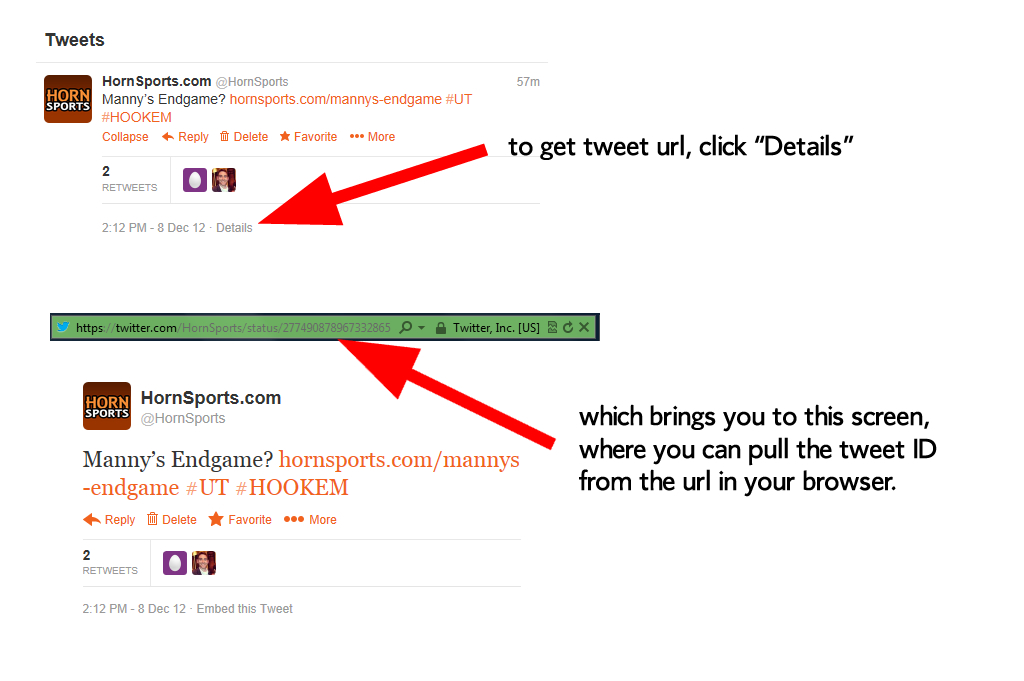
(if you do not know how to access the url of the tweet, click the "Details" link at the bottom of the tweet).
Now, in order for the tweet to render on the boards you only need to use the tweet ID. In this case the tweet id is the number 277490878967332865
Proper implementation would be like this:
[tweet='277490878967332865']
OR
[tweet=277490878967332865]
Which will look like this when you post:
— Twitter API (@twitterapi) November 7, 2011
====================================================
If you need to know how to get the tweet ID, here is a visual:
We all know how handy it is to be able to reference a tweet to help facilitate conversation and we hope this helps with that.
To embed a tweet in your post you simply need to embed the tweet id in between the "tweet tags. "
For example:
This is the url for a tweet from HornSports:
https://twitter.com/HornSports/status/277490878967332865
(if you do not know how to access the url of the tweet, click the "Details" link at the bottom of the tweet).
Now, in order for the tweet to render on the boards you only need to use the tweet ID. In this case the tweet id is the number 277490878967332865
Proper implementation would be like this:
[tweet='277490878967332865']
OR
[tweet=277490878967332865]
Which will look like this when you post:
— Twitter API (@twitterapi) November 7, 2011
====================================================
If you need to know how to get the tweet ID, here is a visual:
There ya go. Now you can say you learned a little bbcode today. Hook 'em!
Last edited: